
Chrome
Chrome Web StoreLive on the Chrome Web Store. Free, and it works on Chrome 116 and newer.
Add to ChromeAvailable nowErioun Companion fills job-application forms from your own profile, CVs and saved answers — on Greenhouse, Lever, Workday, Ashby, Workable and any career site you point it at. It never presses Submit. That part stays yours.
Reviewed by you, then you press Submit. The extension never does.
Free, and it takes about twenty seconds. Sign in with the Erioun account you already have — or create one on the way through.
Live on the Chrome Web Store. Free, and it works on Chrome 116 and newer.
Add to ChromeAvailable nowThe Firefox build is finished and passes Mozilla's packaging checks. Listing it is the next step.
Coming soonAn Edge listing is on the way. In the meantime Edge installs the Chrome version above quite happily.
Coming soonSafari needs its own packaging and App Store review. It is on the roadmap for late 2026.
Late 2026Erioun Companion is free with every plan, including the free one. Only the optional AI actions need a paid plan — most are unlimited, and the few with a monthly allowance show what is left before they run.
Your browser can autofill a name and an email. It cannot pick the right CV, answer “why this company?” or remember what you wrote last time.
Open the sidebar and it lists every field it found, where each answer comes from, and what it cannot answer on its own. Fill one field, or fill the lot. A small marker sits next to each field on the page, so you can always see what it is about to touch — and Alt+Shift+E cycles through them without leaving the keyboard.
Apply with your private @apply.erioun.com address and every reply — interview invite, assessment, rejection — files itself under the right application in Erioun, with the stage moving on its own. Your personal inbox stays out of it, and you never open a spreadsheet to write any of it down.
It picks the CV from your vault, previews it before you commit, drops it straight into the upload field and records on the application which version you actually sent. Switch CVs and the record follows — it replaces the link instead of quietly submitting two files.
Answers you write or correct are saved back to your Erioun answer library — with a visible feed of every save, one-click undo, and an off switch. The tenth form takes a fraction of the time the first one did, because you have already answered most of it.
The sidebar it opens on a job posting, and an application form after it has filled one.
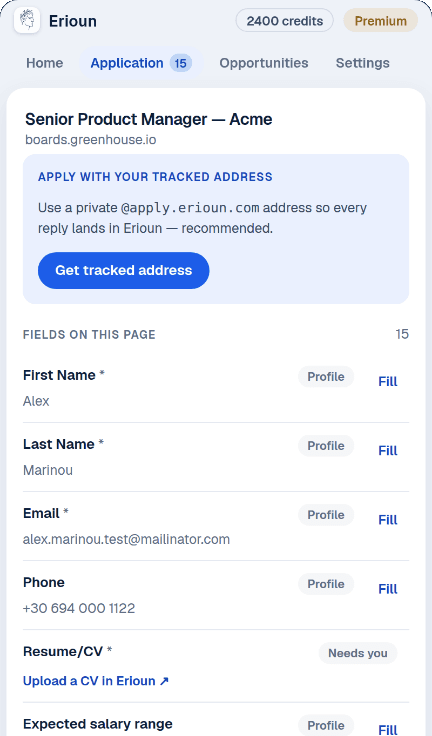
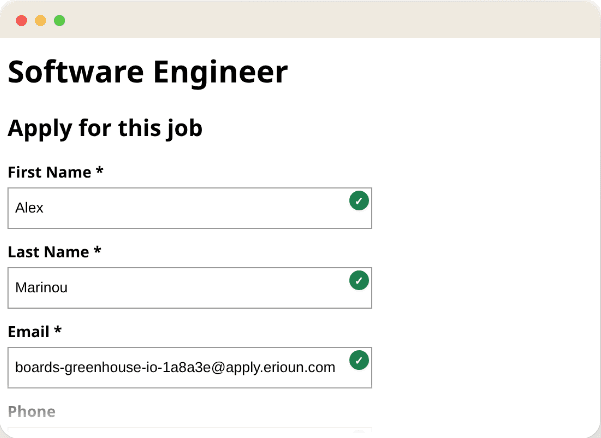
Add it from your browser's store and sign in with your Erioun account — password, an emailed code, Google, LinkedIn, GitHub or a passkey. A free account is enough.
On any supported ATS the sidebar wakes up on its own. On a company's own career site, one click enables Erioun for that site — or turn it on everywhere once, if you would rather not be asked again.
The sidebar shows every field it found and what it intends to write. Fill the whole form at once, or go field by field. Open questions can be drafted with AI, grounded only in your own CV and answers, and always shown to you before anything is written.
You press Send — the extension never does. When it notices the confirmation page it asks whether to mark the application as applied, so your pipeline, follow-ups and reminders stay honest without you maintaining them. That question is the last piece of bookkeeping you do.
It wakes up by itself on the hiring platforms below. Everywhere else — a company's own careers page, a niche portal — one click switches it on for that site, or you can allow every site once and never be asked again.
Workday works in assisted mode. It puts an account wall and an email verification step before the form and rebuilds the page at every stage, so Erioun walks you through the handoffs — never typing your password or your verification code — and fills what it recognises once you are through.
It is installed on your browser and it sees application pages, so the limits matter more than the features. These are the same disclosures the Chrome Web Store listing is certified against.
No auto-apply, no background submissions, no bots. Every application is sent by you, on purpose.
Race and ethnicity, gender, disability, veteran status, religion, sexual orientation, age, national ID numbers, passwords and payment details are never filled, never learned and never sent to AI. That is enforced in the extension and again on the server.
It reads a page only when you act on it — fill, draft, save, track. No analytics beacons, no ad networks, no remote code, and no interest in the other tabs you have open.
Everything travels between your browser and your own Erioun account. We do not sell it and we do not share it. Export or delete it whenever you like.
Erioun Companion is live on the Chrome Web Store today, and it installs in any Chromium browser that can add extensions from there — Edge and Brave included. Dedicated Firefox and Edge listings are on the way, and a Safari version is planned for late 2026.
Yes. Filling forms from your profile, CVs and saved answers is free with any Erioun account, including the free one. Only the optional AI actions — drafting an open question, writing a cover letter, tailoring a CV to the role — need a paid plan. Most are unlimited; writing a cover letter or a long answer, or tailoring a CV, uses a monthly allowance shown before it runs.
No, and it never will. Erioun Companion fills the form and then stops. There is no auto-submit button, no background applying and no mass-apply mode — you review what it wrote and press Send yourself. Mass-applying with generic answers is what gets people ignored.
It runs automatically on Greenhouse, Lever, Ashby, Workable, SmartRecruiters, BambooHR, Recruitee, Personio, Rippling, Breezy, Teamtailor and Pinpoint. Workday is supported in assisted mode. On any other career site, one click enables it for that site.
Workday puts an account wall and an email verification step before the form, and rebuilds the page at every stage. Erioun guides you through those handoffs — it never types your password or your verification code — deep-links you to where the code lands, and fills the fields it recognises. You finish and submit.
It reads your Erioun profile, saved answers and CV list to fill forms, and writes back the answers you type so the next form is faster. It sends data only when you act on a page. Sensitive and equal-opportunity fields are excluded from filling, saving and AI everywhere. Nothing is collected while you browse, nothing is sold, and you can export or delete it all from your account.
Yes — the extension is the companion to your Erioun account, not a standalone form filler. It fills from your profile, your CV vault and your answer library, so it needs to sign in to reach them. Creating an account is free.
It reports what it did per field, and it verifies each value after writing it. Where a site reformats what you typed — a phone number, a date — that counts as filled; anything truncated, altered or cleared is reported as failed so you can fix it. Fields it cannot answer are listed as needing you, rather than guessed at.
Install it, sign in, and the applications you send start filing themselves — with the CV you used, the replies that come back and the follow-up you owe, all on one record.