Free tools · Notion

Job application tracker for Notion

One duplicatable database with the same columns as the spreadsheet versions, four views over it — table, board by stage, a chart, and a Needs you now list — and two properties that work themselves out: Quiet counts the days of silence, and Attention tells you which row to open first.

  • No email required
  • No macros
  • Nothing sent to us
  • Free forever
The Notion template's database, with tabs for a table, a Needs you now list, a board and a chart, and a self-ranking Attention column.

Get the Notion template

Free, no macros, no signup, yours to keep. The file downloads the moment you click.

See it before you duplicate it

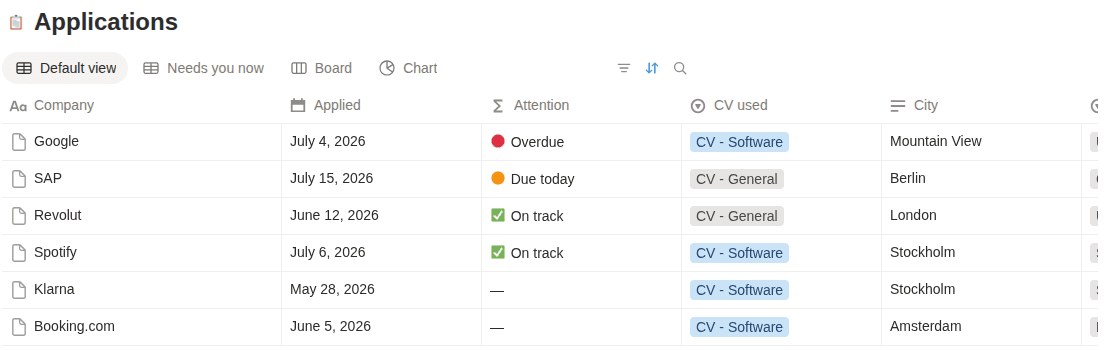
A shot of the live template as an anonymous visitor sees it — not a mockup. The figures come from the six example rows it ships with.

The Notion template's Applications database, with tabs for a table, a Needs you now list, a board and a chart, and an Attention column reading Overdue, Due today and On track.
Four views over one database, and an Attention column that ranks itself — overdue first, then due today, then whatever has gone quiet.

What makes this one different

Most free job application tracker templates are a blank grid with a status column. This one does four things on its own.

Views that count themselves

A board grouped by stage, with a live count on every column. A chart breaking your applications down by country. A Needs you now list of what is actually due. And a table for editing. Four views over one database — add your own in a click, and Notion tallies each of them for you.

A column that spots ghosting

Quiet counts the days since anything last happened on each application — their reply if there was one, otherwise the day you applied. Amber at 14 days, red at 21, blank once it's closed. It is the one thing a spreadsheet can genuinely work out on your behalf, and most templates don't.

Follow-ups that refuse to be forgotten

Every row gets a next step and a due date. Overdue dates turn red, today's turn amber, and the Dashboard lists whatever is soonest. It also counts the live applications you've left without a next step — the ones that quietly fall out of a job search.

Nothing to sign up for

Hit Duplicate and the copy is yours, in your own workspace, on the free plan. You never request access to ours and we never get access to yours. No email address is required, and nothing about who you are applying to comes back to us.

What's inside the Notion template

The columns that answer “what did I send, to whom, and what's next?” — and not one more. Two of them fill themselves in.

Every morning

The block that drives your day — and it fits on any screen without scrolling sideways.

Company
Who you applied to.
Position
The exact title from the posting.
Status
One of ten stages, Saved through Archived. Colour-codes itself.
Next step
The one thing to do next. Never leave it empty.
Due
When to do it. Goes amber today, red once it's late.
Quiet
Days since anything happened — fills itself in. Amber at 14, red at 21.

When something happens

The two dates that make the response rate and the silence-spotting work.

Applied
The date it actually went out.
Last reply
When you last heard from them. Drives the response rate.

Worth knowing later

Context you'll want when three offers land at once — or when none do.

Country
Pick from the list — feeds the top-countries chart.
City
Where the role sits.
Work mode
Remote, hybrid or on-site.
Salary
Posted or guessed — with its own currency column, so the average means something.
CV used
Which CV they have — the thing everyone forgets.
Email used
Which address you applied from, when you run more than one.
Source
Where you found the role.
Job link
The posting, before it disappears.
Notes
Anything future you will want to know.

Status stages: Saved · Preparing · Applied · Assessment · Interview · Final stage · Offer · Rejected · Ghosted · Archived — the same ten stages Erioun uses, so moving up later is a rename-free experience.

How to use it

  1. Duplicate the template

    Open the page and hit Duplicate in the top-right. The copy lands in your own workspace and belongs to you — we never see it, and you never need to ask us for access.

  2. Add a row the day you apply

    Company, position, the date, and which CV went out. Status, country, source, work mode, CV and currency are all dropdowns, so most of an entry is a few clicks.

  3. Always fill Next step and Due

    The Attention column reads those two, and the Needs you now view is built on it. An entry with no due date quietly stops asking you for anything.

  4. Sort by Attention each morning

    It ranks itself: overdue first, then due today, then the ones going quiet. Work down the list, then close the tab.

Frequently asked

Does the tracker work on Notion's free plan?

Yes — every part of it. The database, all four views including the chart, the dropdowns and both self-calculating columns work on a free personal workspace. It deliberately avoids Notion's Dashboard view, which is a Business-plan feature; the board's per-column counts and each view's Calculate footer give you the same numbers for free.

Which views does the Notion template include?

Four. A table for editing, a board grouped by Status so you can see the pipeline and its counts, a chart breaking your applications down by country, and a Needs you now list for what's actually due. Adding your own is a click — chart by source is a good next one.

What do the Quiet and Attention columns do?

They're formulas, so they fill themselves in. Quiet counts the days since anything last happened on an application — their reply if there was one, otherwise the day you applied — and goes blank once it's closed. Attention turns that into a verdict: 🔴 Overdue, 🟠 Due today, 🔴 Silent 21+ days, 🟠 Going quiet, ⚪ No next step, or ✅ On track, most urgent first. Sorting by it is the whole morning routine.

Can Notion remind me to follow up?

It can show you what's due — that's what Attention and the Needs you now view are for — but it cannot come and find you. Nothing arrives in your inbox, and nothing notices that a reply landed. You still have to open the page. That's the honest gap between a template and a tracker that reads your mail.

Notion or a spreadsheet — which should I use?

Use Notion if you already live there; the board view is genuinely nicer for pipelines. Use Sheets or Excel if you want faster bulk editing and sorting. Both are manual — the columns are identical, so switching later is painless.

The honest upsell

This is the manual version.

Erioun fills itself in — every application gets its own email address, replies file themselves and statuses stay current. You're always one tap from adjusting, and nothing is ever sent without you.